


NEWYou can now listen to Fox News articles!
If you use more than one Android device with the same Google account, you know how messy things can get.
Tracking which apps are installed on which phone or tablet can quickly become confusing. The Google Play Store already showed how many of your devices had a particular app, but uninstalling apps across multiple devices required digging through several menus.
That’s changing now, thanks to Google’s latest Play Store update.
Sign up for my FREE CyberGuy Report
Get my best tech tips, urgent security alerts and exclusive deals delivered straight to your inbox. Plus, you’ll get instant access to my Ultimate Scam Survival Guide — free when you join my CYBERGUY.COM newsletter.
APPLE RELEASES IOS 26.1 WITH MAJOR SECURITY IMPROVEMENTS AND NEW FEATURES FOR IPHONE USERS
The new uninstall button rolls out
Google is rolling out version 48.8 of the Play Store, and it introduces a new ‘Uninstall’ button right on each app’s listing. You can now remove an app from any of your devices directly from your main phone. This eliminates the need to pick up each device and remove the app one by one. According to Android Authority and other reliable tech outlets, this feature appears beside each Android device listed under your account, making it faster to keep your devices organized and clutter-free.
The update replaces the older process that required navigating through ‘Profile,’ then ‘Manage Apps and Devices,’ then applying a device filter before uninstalling. That long-winded method still works, but the new shortcut saves time and effort. The feature is rolling out gradually, so you might not see it right away, but it should appear soon as part of the stable update.
Why this update matters
For anyone juggling a phone, tablet or even a work device, this new feature makes a real difference. Over time, unused apps pile up, taking up storage space and slowing down performance. Being able to remove them remotely helps keep every device clean and efficient without switching between screens.
The change also improves digital hygiene. Many people forget about apps on old phones that still have access to personal data or permissions. Now you can easily remove those apps before they become a privacy or security risk. The update also makes it simpler for parents managing family devices to stay in control of what’s installed on their kids’ phones.
How to use the new uninstall button on Android
Settings may vary depending on your Android phone’s manufacturer.
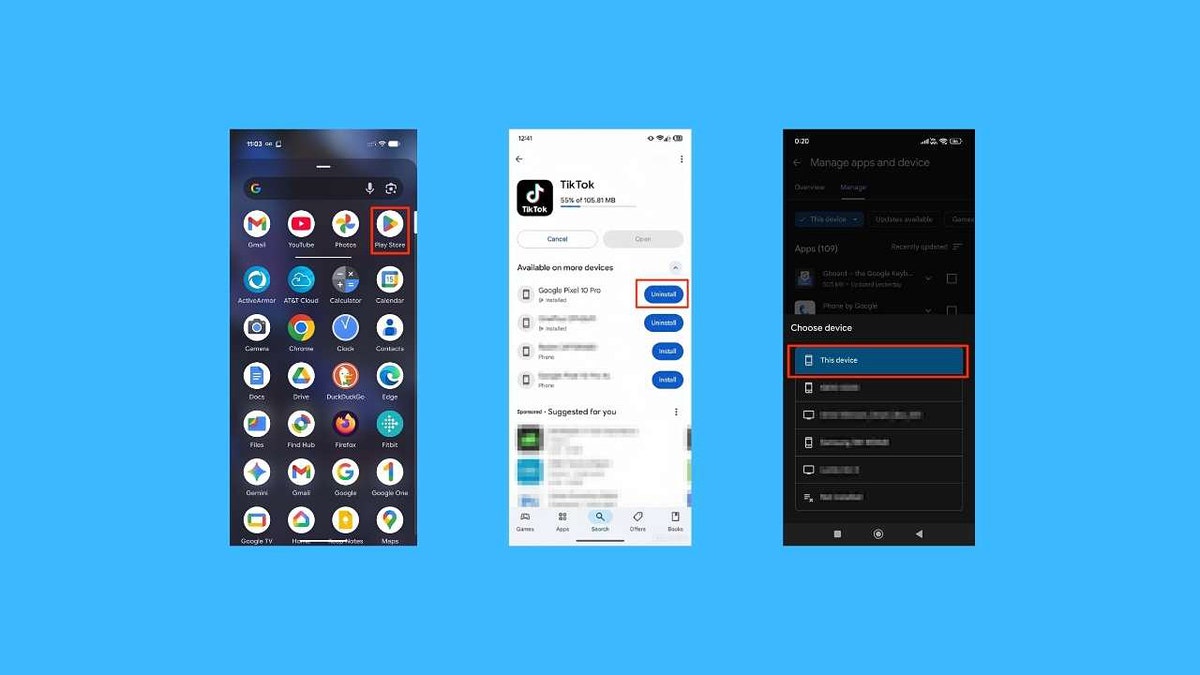
- Open the Play Store app on your device.
- Navigate to the listing of an app that you know is installed on another device signed in to your account.
- Under the “Installed on X devices” section, you may see a new ‘Uninstall’ button next to each listed device.
- Tap Uninstall next to the one you want to remove from your Android.
Then click This Device.
GOOGLE CHROME AUTOFILL NOW HANDLES IDS
How to uninstall Android apps when the new Play Store button isn’t showing
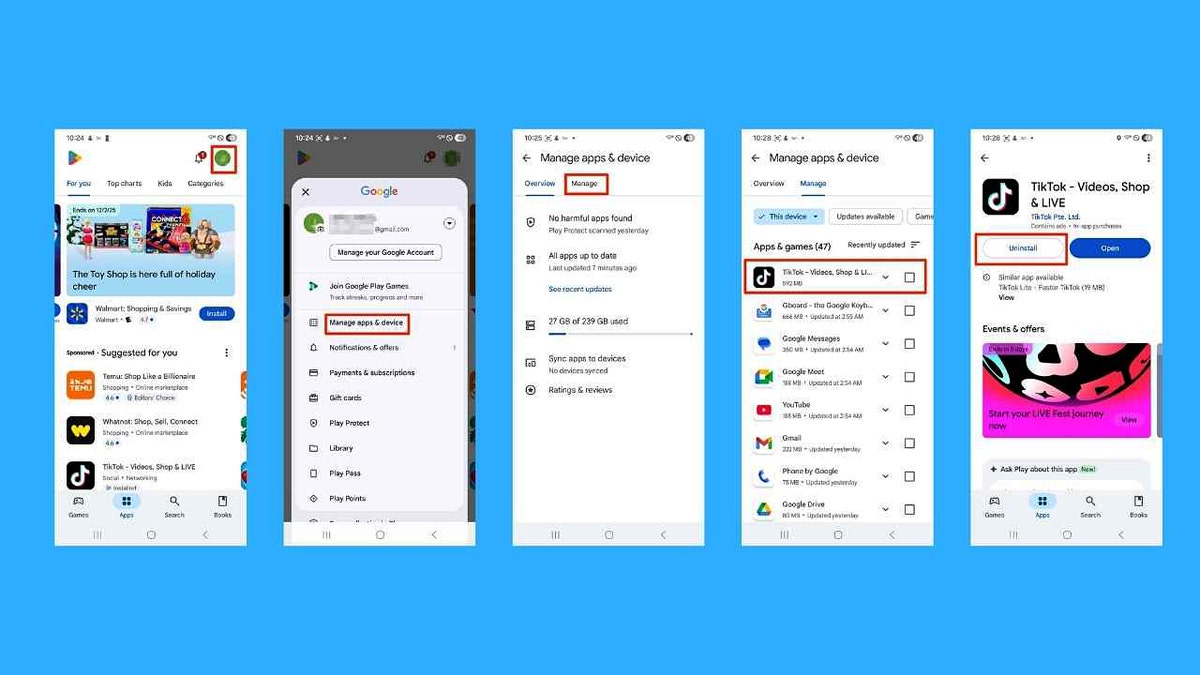
Wait for the update to roll out if key features aren’t showing yet. If the button isn’t present, you can still uninstall an app with these steps:
Settings may vary depending on your Android phone’s manufacturer.
- Click Profile.
- Tap Manage apps & devices.
- Click Manage.
- Use the device filter to select the target device.
- Press the app you want to uninstall.
Click uninstall.
What this means to you
This feature saves time, improves organization and helps you keep your Android devices running smoothly. By uninstalling unused apps remotely, you free up valuable storage and reduce unnecessary background activity that can drain battery life. You also make your devices more secure by removing older apps that might not be receiving updates anymore. It’s a thoughtful update that shows how Google is paying attention to everyday usability rather than adding flashy new tools. Even if it seems like a small change, the impact adds up for people who live in a multi-device world.
Take my quiz: How safe is your online security?
Think your devices and data are truly protected? Take this quick quiz to see where your digital habits stand. From passwords to Wi-Fi settings, you’ll get a personalized breakdown of what you’re doing right and what needs improvement. Take my Quiz here: Cyberguy.com.
Kurt’s key takeaways
The new ‘Uninstall’ button in Play Store version 48.8 is a quiet but powerful improvement for Android users. It makes it easier to manage your apps and maintain a cleaner digital environment across all your devices. Once this update reaches your phone, it’s worth exploring which apps you no longer need and removing them in just a few seconds.
Do you plan to tidy up your devices using the new Google Play Store feature, or do you prefer to manage apps directly from each phone? Let us know by writing to us at Cyberguy.com.
Sign up for my FREE CyberGuy Report
Get my best tech tips, urgent security alerts and exclusive deals delivered straight to your inbox. Plus, you’ll get instant access to my Ultimate Scam Survival Guide — free when you join my CYBERGUY.COM newsletter.
Copyright 2025 CyberGuy.com. All rights reserved.
Read the full article here


